
WordPress Website Maintenance: What It Includes and Why It Matters

There is a version of WordPress maintenance that most site owners imagine: log in once a month, click “Update All,” and move on. This is the version that produces hacked sites, degraded performance, ranking drops, and broken checkout flows, usually at the worst possible moment.
Real maintenance is something different. In the broadest sense, it refers to all the actions you take – modifications, corrections, improvements, to keep your site functional, secure, and efficient over time. It is not a single task. It is a discipline applied consistently across several interconnected areas, each of which can cause significant damage when neglected.
Why WordPress Maintenance Is Non-Negotiable
WordPress is a dynamic system : core software, themes, plugins, a database, a server environment with moving parts that interact with each other and with the outside world. Each of those moving parts changes over time. Plugins receive updates that introduce new dependencies. Security vulnerabilities are discovered and disclosed publicly, meaning attackers know about them whether or not you have patched them. Traffic patterns shift, Content accumulates, and the database grows.
Neglecting maintenance does not preserve the status quo. It allows a controlled, healthy system to drift toward instability. A site that is working today and receives no maintenance attention will, predictably, become slower, more vulnerable, and less reliable over time. The only question is how long that process takes.
For sites running WooCommerce or other transactional functionality, the stakes are still higher. A broken checkout or a compromised payment flow is a direct business loss with potential legal implications.
What WordPress Maintenance Actually Includes
1. Security Management
WordPress is the most widely used CMS in the world, which makes it the most commonly targeted. New vulnerabilities are disclosed constantly in core, plugins, themes, and server software. Security is not a configuration you set once and forget.
Professional security maintenance operates across several layers:
- Active threat blocking requires a Web Application Firewall to filter malicious traffic before it reaches WordPress. At the DNS level, services like Cloudflare handle volumetric attacks and bot filtering. At the application level, security tooling manages WordPress-specific threats, REST API controls, and file integrity monitoring. Neither layer alone is sufficient.
- Malware scanning and file integrity monitoring watches core files and flags unexpected changes. Malware injections frequently modify core files or plant new ones in locations they should never appear. Without automated monitoring, these changes go unnoticed until the damage is done.
- Credential security is where most compromised sites were vulnerable to begin with. Default usernames, weak passwords, no two-factor authentication, and excess admin accounts are not sophisticated attack vectors, are open doors. A proper maintenance routine audits access controls regularly, removes inactive accounts, and enforces least privilege across every user role.
- Plugin and theme hygiene matters more than most site owners realise. Outdated plugins and themes are the single largest source of WordPress vulnerabilities year after year. Deactivated does not mean safe, the files remain on the server and can still be exploited. Plugins abandoned by their developers represent a permanent, unpatched risk. Remove everything that is not actively needed, and assess anything that has not been updated in over a year.
Pre-emptive hardening is always cheaper and less damaging than hack recovery.
Read More : Explore our comprehensive WordPress security resource on How to Secure Your WordPress Site in 2026 , where you’ll discover the latest WordPress security best practices, essential plugins, and proven strategies to keep your website safe and secure.
2. Routine Updates: Core, Plugin, and Theme Updates
Keeping WordPress core, themes, and all active plugins on their latest versions is the most fundamental maintenance task, and the one most commonly done carelessly.
Updates serve two purposes: they patch known vulnerabilities, and they maintain compatibility between components. When multiple plugins are outdated simultaneously, the potential for conflicts multiplies.
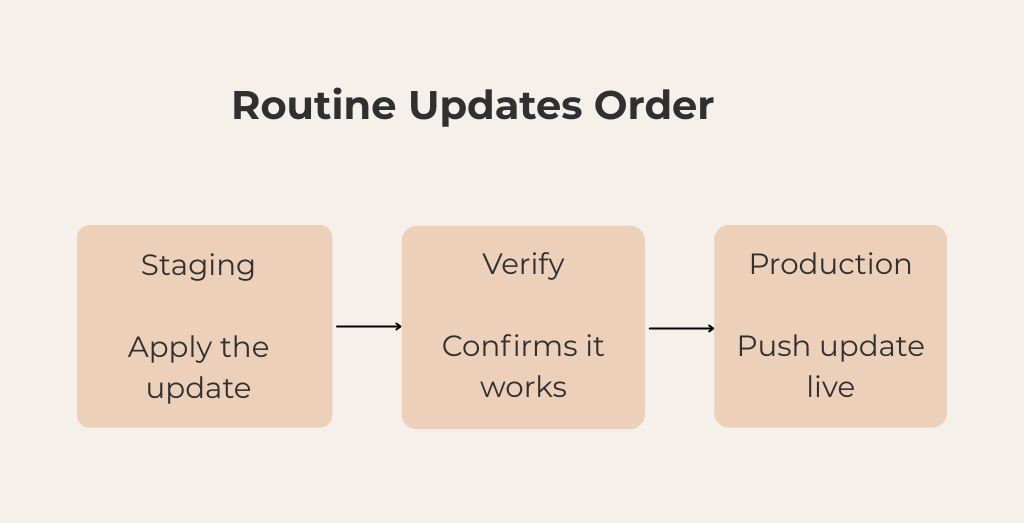
The detail most guides skip: updates should never be applied directly to a live site without testing first. The correct approach is a staging environment. A private copy of the site where updates can be applied and verified before they touch production. Apply the update on staging, check that nothing has broken, and only then push it live. Done this way, going live is a controlled, already-verified step rather than the point where problems are first discovered.
3. Backups and Database Cleanup
A backup that has never been tested is not a backup – it is a file you hope will work when you need it most.
The standard for any managed site is dual-layer backup coverage. An application-level backup via a WordPress plugin, combined with a server-level backup from the hosting provider. Relying on only one is a single point of failure. Offsite storage for both backup types eliminates the risk of a backup being stored on the same server that was compromised. Knowing in advance how long a restore takes means no surprises when it counts.
Database cleanup is the maintenance task most often ignored entirely. Over time, WordPress databases accumulate unnecessary weight: post revisions, transient options, orphaned metadata, spam comments, and residue from removed plugins. One-off events leave a particularly long tail here, switching page builders or moving hosts, for example, frequently leaves behind the original builder’s data and plugin-specific tables long after the switch is otherwise complete. Routine cleanup keeps the database lean and performing efficiently.
4. Performance Optimisation
Site speed is not a fixed property, it degrades without active maintenance. Images uploaded without compression accumulate in the media library. Plugins are added over time without anyone auditing what they load. Caching configurations become misaligned with changes to the hosting environment.
The most common pattern on neglected sites are an excess of speed plugins poorly configured and conflicting with each other. A caching plugin layered on top of another caching plugin, An image optimisation plugin running alongside a page speed plugin that also does image optimisation. More plugins do not produce a faster site. In most cases they produce a slower one, and occasionally a broken one.
Performance maintenance means keeping the plugin stack lean, ensuring images are properly compressed, and auditing periodically for script and stylesheet bloat. Before any speed intervention, run a tool like Query Monitor to understand exactly what is loading on each page and what database queries are running.
5. Functionality Checks
A site can pass a visual inspection and still have broken functionality that is costing real money. Contact forms that silently fail to deliver, Checkout flows that break on specific device and browser combinations. Broken internal links that degrade both user experience and search crawlability. None of these announce themselves, they accumulate quietly until a user encounters them.
Routine functionality checks catch these issues before they compound. This means:
- Testing contact forms and lead capture mechanisms to confirm submissions are delivered
- Running the checkout process end to end across device types and browsers
- Scanning for broken internal and external links
- Reviewing error logs for recurring issues not visible on the front end
These checks matter most in the period following any significant change, a plugin update, a theme modification, a migration, or a server-side configuration change. A maintenance routine that includes a defined post-change monitoring window ensures issues are caught quickly rather than discovered by users at the worst possible time.
The Real Cost of Skipping Maintenance
The damage from deferred maintenance almost never comes alone. A neglected site typically has outdated plugins, a bloated database, broken functionality, and degraded performance simultaneously and that combination makes recovery significantly more expensive than any individual issue would have been in isolation.
SEO damage is where the cost is most lasting. Rankings that drop because of a security incident or unresolved crawl error do not recover overnight. Search engines need to recrawl, reassess, and rebuild their understanding of the site, a process measured in weeks or months. That loss compounds daily.
Emergency recovery work is inherently more expensive than planned maintenance because it works backwards from an unknown state, under time pressure, without the preparation that consistent maintenance would have provided.
Bottom Line
WordPress maintenance is not a one-time task, it is an ongoing commitment to security, performance, and reliability. While these responsibilities can be managed in-house, they require consistent attention and expertise. If you would rather focus on running your business than monitoring updates, backups, and security alerts, our WordPress maintenance team can help. We provide proactive maintenance and support to keep your website secure, optimized, and performing at its best, so you can concentrate on what matters most: growing your business.

Leave a
Comment.